



Website search is the one place on your site where customers tell you, in their own words, exactly what they couldn’t find. They’ve already clicked your ad, trusted your listing or followed a recommendation. Then they land, look around, and type a few words into the little box in the corner. Whatever they type is a message to you. Most businesses never read it.
That’s the website search blind spot. Traffic reports tell you how people arrived. Conversion reports tell you whether they bought. But the search box tells you what they wanted in between, and that’s often the most useful information on your whole site. In this guide we’ll look at what customers search for, why the data gets ignored, and how to fix it. If you run a business website, manage an online store or work with a web development company in Australia, this is a quiet win waiting to be claimed.
What Is the Website Search Blind Spot?
The blind spot is the gap between what visitors look for and what your team knows they look for. Most analytics setups follow people from source to page to sale, but they skip the moment someone gives up on navigation and starts typing.
Think of a shopkeeper who never listens when customers ask, “Do you have…?” They’d miss every product request, every confusing label and every sign that the shelves are in the wrong order. Your search box is that conversation, happening hundreds of times, with nobody listening.
Why Website Search Visitors Matter So Much
People who use website search have usually decided they want something specific. They’re not idly browsing. They know the thing they’re after and they’re willing to spend effort finding it. That makes search sessions some of the highest-intent visits you’ll ever get.
It also makes failure expensive. If a searcher types the exact product or service you sell and sees “no results found”, they rarely try a second time. They go back to Google and click the next result. Fixing search is often cheaper than winning that visitor back with another ad.
Why Most Australian Businesses Never Look at Website Search Data
The data is usually there. The habit of looking at it isn’t. A few common reasons explain why.
1. Nobody owns it
Marketing owns traffic. The developer owns the build. Customer service owns complaints. Search sits between all three, so it belongs to no one.
2. Tracking was never switched on
Many sites have analytics installed but never configured to record internal searches. The terms customers type simply vanish.
3. The default search is basic
Out-of-the-box search on many platforms matches words literally. It can struggle with typos, plurals and synonyms, so the results look broken, and the team assumes people rarely use search at all.
4. Reports focus on traffic sources
Dashboards love acquisition numbers. Looking at what happens after arrival feels like a secondary task, even though it’s where the lessons are.
5. Privacy worries
Some teams avoid the data because they fear collecting personal information. That’s a fair concern, and we’ll cover how to handle it properly below.
What Customers Search for After They Arrive
Every site has its own patterns, but the same categories show up again and again. Check these first when you open your search report.
- Products and services by a different name. Customers use everyday words while your site uses internal jargon.
- Prices and quotes. Searches like “price”, “cost” or “quote” often mean your pricing is too hard to find.
- Contact details, hours and locations. If people search for your phone number or address, your navigation isn’t surfacing them.
- Delivery, returns and warranty. These searches usually signal last-minute doubt before a purchase.
- Brand or model numbers. Exact codes and SKUs show that shoppers know precisely what they want.
- Misspellings and shortcuts. Typos are a fact of life, especially on mobile.
- Things you don’t sell. These show unmet demand and may point to your next product or service.
Local language matters too. Here’s a made-up example. A Brisbane homewares store lists its bedding as “duvets”, while many customers type “doona”. The search finds nothing, the visitor leaves, and nobody on the team ever sees the failed term. Reading the search log would have caught it in a week.
How to Track Website Search in GA4
If you use Google Analytics 4, tracking website search can be quick. Here’s how it works.
- Turn on enhanced measurement. In your web data stream settings, make sure the site search option is enabled.
- Check your query parameters. By default, GA4 records a view_search_results event when the URL contains one of q, s, search, query or keyword, as set out in Google’s enhanced measurement documentation. If your search uses something different, add it in the advanced settings.
- Find the data. Open the Events report, select view_search_results and look at the search term dimension.
- Test it. Run a search on your own site and confirm the event shows up.
Some search tools don’t use a visible URL parameter, so they need custom event tracking instead. A developer can set that up in an afternoon.
One important warning. Google requires that you don’t collect personally identifiable information through analytics. People sometimes type names, emails or order numbers into search boxes, so review your terms regularly and strip any personal details. The Office of the Australian Information Commissioner provides guidance on privacy obligations for Australian businesses.
Website Search Metrics Worth Watching
You don’t need a dozen dashboards. A handful of numbers will tell you most of what you need to know about how your search is performing.
| Metric | What it tells you | What to do |
| Top search terms | What visitors want most. | Make these easy to find in navigation and on the homepage. |
| Zero-result searches | Where demand has no answer. | Add synonyms, content or products. |
| Search refinements | Searches that were rewritten straight away. | Improve ranking or add filters. |
| Searches per session | How hard people work to find things. | Review navigation on pages with high search use. |
| Conversion after search | Whether searchers go on to buy or enquire. | Compare against non-searchers to see the value of search. |
| Search start page | Which pages send people to the search box. | Fix unclear content on those pages. |
Common Website Search Problems and How to Fix Them
Once you start reading the data, patterns of failure show up quickly. Most of them have simple fixes.
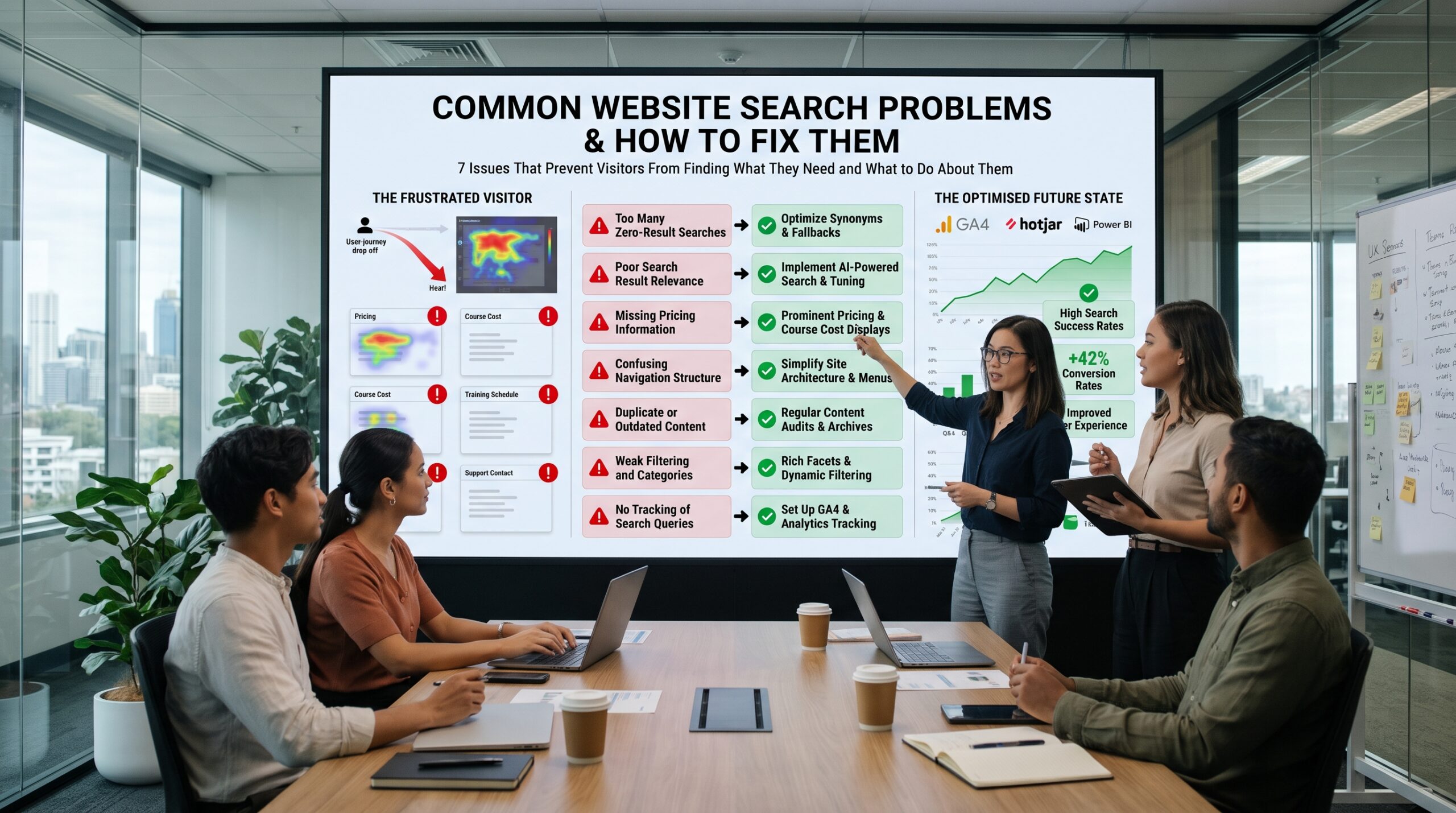
| Problem | Why it hurts | Quick fix |
| Dead-end “no results” page | Visitors leave immediately. | Offer suggestions, popular pages and a contact link. |
| No typo tolerance | Small spelling slips return nothing. | Enable fuzzy matching or spelling suggestions. |
| Missing synonyms | Local words and jargon don’t match. | Build a synonym list from your search logs. |
| Poor ranking | Best results sit below weak ones. | Boost key pages and best sellers. |
| Hidden search box | Mobile users can’t find it. | Place it clearly in the header. |
| No filters | Large result lists overwhelm people. | Add category, price and availability filters. |
Usability experts such as the Nielsen Norman Group have published plenty of research on search design, and it’s worth reading before you rebuild anything. Start with the quick wins first. A helpful no-results page often delivers more than a costly platform change.
Website Search on Ecommerce Platforms
Your platform shapes what’s possible. Shopify, WooCommerce, WordPress and Magento all handle website search differently, and the built-in version is often only a starting point. Some stores need better filters, typo tolerance or smarter ranking. Others just need cleaner product titles and tags.
If you’re planning a rebuild or migration, make search part of the brief from day one. We cover this in our Shopify development services, WooCommerce development and WordPress development. Stores moving platforms can also look at ecommerce migration and ecommerce website redesign, where search quality is easy to lose by accident.
A Simple Website Search Audit You Can Run This Week
Here’s a practical routine you can finish in an hour or two.
- Export the last 90 days of search terms. Sort by how often each was searched.
- Run your top 20 terms yourself. See what a visitor sees. Note anything odd.
- List zero-result searches. These are your quickest fixes: add synonyms, rename pages, or create the missing content.
- Check where people searched from. Pages with lots of searches are often pages with unclear navigation.
- Test on mobile. Make sure the search box is easy to find and easy to tap.
- Fix the top five issues. Then check the numbers again in a month.
- Repeat quarterly. Customer language changes, and so should your site.
How Website Search Helps Your SEO
Internal search terms are a free source of keyword ideas. They show the exact phrases your customers use, which often differ from the ones in your marketing copy. If many visitors search for a topic your site covers poorly, that’s a clue to write a better page for it.
It also helps technical decisions. Strong search keeps people engaged, helps them reach the right pages and supports your wider strategy, including ecommerce SEO. Remember that internal search data is separate from what you see in Google Search Console, which reports on searches that bring people to your site. Together, the two give you the full journey: what people searched before they arrived, and what they searched after.
Website Search Across Australian Cities
Australian businesses often serve customers in several cities, and local words, suburbs and expectations vary. A shopper in Perth may search for a store “near me”, while a customer in Sydney may type a suburb. Regional language differs as well, so your synonyms list should reflect how Australians really talk.
We support businesses across the country:
- Web development in Melbourne
- Web development in Sydney
- Web development in Brisbane
- Web development in Perth
- Web development in Adelaide
- Web development in Canberra
You can see every Australian location on one page.
When to Get Help With Website Search
You can fix a lot yourself. But if your search tool needs replacing, your tracking is patchy, or your platform limits what’s possible, a developer can save weeks. Our team builds and improves custom websites and applications, and you can browse all of our web development services or ecommerce services. For small teams, our small business website development is a good place to start.
Want a second opinion? Read more on our web development blog, check the FAQs, learn about us, or request a free audit. You can also call 1300 649 299.
Website Search FAQs
What is website search?
It’s the search box on your own site that lets visitors look for pages, products or information. It’s also called internal site search or on-site search.
How do I see what customers search for on my site?
Turn on site search tracking in Google Analytics 4, or use the reporting built into your search tool. Then review the list of search terms regularly.
What is a zero-result search?
It’s a search that returns nothing. These terms are valuable because they show exactly what customers want that your site can’t currently show them.
Is website search tracking safe for privacy?
Yes, if you avoid collecting personal information. Review the terms and remove anything containing names, emails or order details.
Does every website need a search box?
Not always. Small sites with simple navigation may not. But stores, large service sites and resource libraries usually benefit from one.
Final Thoughts: Start Listening to Your Search Box
The website search blind spot costs more than most people realise, because the lost customers never complain. They just leave. Turn on tracking, read the terms, fix the zero-result searches and review the data every quarter. If you’d like help making your site easier to search and easier to buy from, explore our web development services across Australia and take the first step today.