

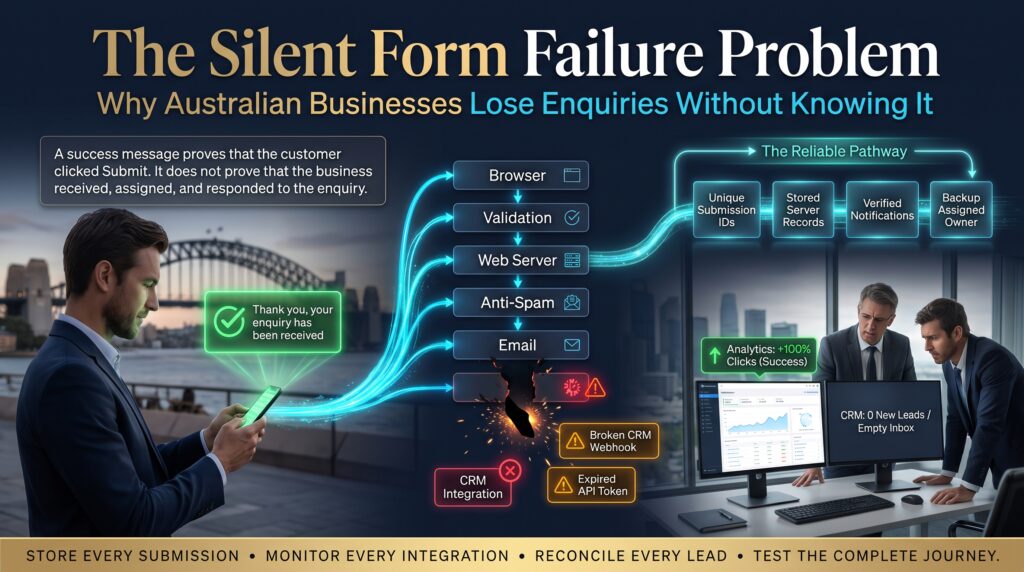

A website contact form that quietly stops working is one of the most expensive problems a small business can have, and one of the hardest to notice. Visitors fill it in, click submit, see a friendly thank-you message and wait. Your team never gets the email. Nobody complains, because the customer simply assumes you’re not interested and rings someone else.
We call this the silent form failure problem: enquiries that disappear between the customer’s click and your inbox, with no error message on either side. This guide explains why it happens, how to check your own website contact form in about ten minutes, and what Australian businesses in Sydney, Melbourne, Brisbane, Perth, Adelaide and Canberra can do to stop it happening again.
What Is the Silent Form Failure Problem?
The silent form failure problem is any situation where a form appears to work for the visitor but the enquiry never reaches a person who can act on it. The form looks fine. The button clicks. The thank-you page loads. And yet the message is stuck in a spam folder, blocked by a mail server, rejected by a broken plugin or sent to an inbox nobody checks.
What makes it dangerous is the silence. A slow website or a broken checkout gets noticed quickly because customers complain. A failed enquiry leaves no trace, so the business only sees the symptom: fewer leads than the traffic should be producing.
Why a Website Contact Form Stops Working Without Warning
Forms rarely fail because of one dramatic fault. More often it’s a quiet change somewhere in the chain between the page and your inbox. Here are the most common culprits.
1. Email Deliverability and Authentication Issues
Many form plugins send email from your own domain using the web server, with no proper authentication. Mail providers are increasingly strict about this. Records such as SPF, DKIM and DMARC help receiving servers confirm that an email genuinely came from you. If they’re missing or wrong, your form notifications may land in junk or get rejected without anyone being told.
2. Plugin, Theme or Platform Updates
A routine update to WordPress, a theme or another plugin can break a form’s script or its mail settings. Because the page still loads, nobody notices until someone asks why the phone has gone quiet.
3. Overzealous Spam Protection
CAPTCHA tools and honeypot fields protect your inbox, but when they’re misconfigured they can also block real customers, particularly on mobile devices or privacy-focused browsers. A form that rejects genuine visitors is just as costly as one that never sends.
4. Notifications Sent to the Wrong Place
Staff leave, mailboxes get deleted and “info@” addresses change hands. If your form still emails a former employee, the enquiry goes nowhere. This is surprisingly common on sites built several years ago.
5. Broken Integrations With CRM or Email Tools
Many forms push data into a CRM, a spreadsheet or an email platform. When a connection token expires or a field name changes, the integration fails quietly and leads never reach the sales team.
6. Mobile and Browser Bugs
A button that works on your laptop might be hidden behind a cookie banner on a phone, or a script error might stop the form submitting on one browser. With most web traffic now on mobile, these faults can quietly affect more than half your visitors.
What a Silent Website Contact Form Failure Really Costs
Here’s a simple, hypothetical example. Suppose 40 people submit your website contact form each month and 10 of those messages never reach your inbox. If one in four of those lost enquiries would have become a customer, and an average job is worth $2,000, you’re losing around $5,000 a month, or $60,000 a year, from a fault that may take an hour to fix.
Your numbers will differ, but the logic holds. You’ve already paid for the traffic through SEO, ads or word of mouth. A broken form wastes all of that investment at the final step.
Warning Signs Your Website Contact Form Is Failing
- Enquiries have dropped even though website traffic looks stable.
- Customers say “I filled in your form but never heard back.”
- Your inbox gets form emails in bursts rather than steadily.
- Form notifications appear in spam or junk folders.
- You haven’t tested the form since the website was last updated.
- Your analytics shows form page visits but few or no thank-you page views.
If two or more of these sound familiar, test your website contact form today rather than waiting for the next quiet month.
Common Website Contact Form Failures and How to Fix Them

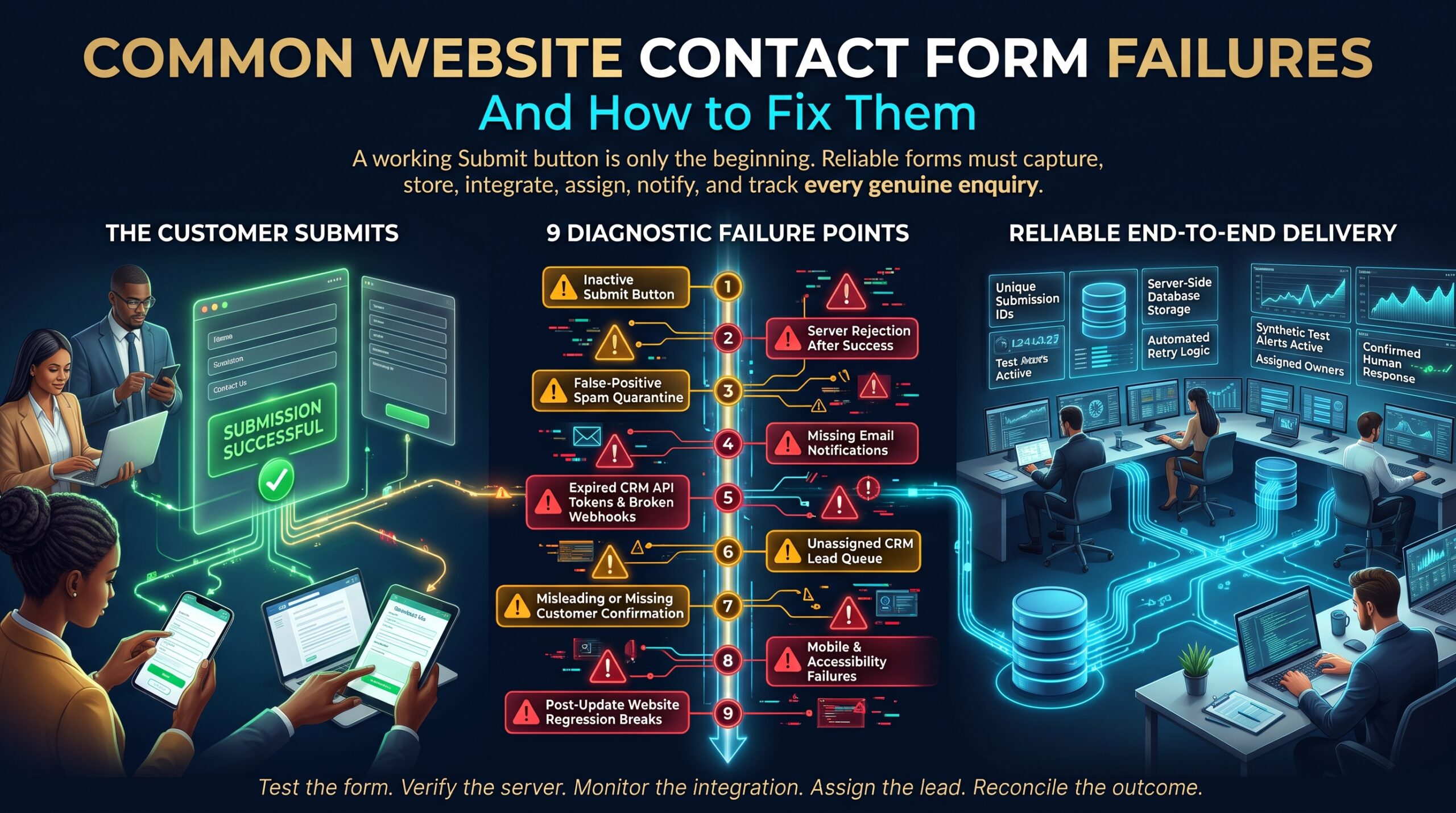
| Problem | What you’ll notice | Typical fix |
| Poor email authentication | Notifications land in spam or never arrive | Set up SPF, DKIM and DMARC and send via a proper SMTP service |
| Plugin conflict after update | Submit button does nothing or shows an error | Update, test and roll back the conflicting plugin |
| Aggressive spam filter | Real customers report being blocked | Adjust CAPTCHA settings and review blocked entries |
| Outdated recipient address | Messages go to a former staff member | Update recipients and add a second team address |
| Failed CRM integration | Leads appear in email but not in the CRM | Reconnect the integration and set failure alerts |
| Mobile layout bug | Fewer mobile enquiries than expected | Test on real phones and fix overlapping elements |
How to Test Your Website Contact Form in 10 Minutes
- Submit a real test. Fill in the form using a Gmail address and again with an Outlook or Microsoft 365 address. Note how long each email takes to arrive.
- Check spam and junk. Look in the recipient’s spam folder as well as the inbox. If a test message is there, authentication needs attention.
- Test on a phone. Use both iPhone and Android if you can. Make sure the button is visible and the thank-you message appears.
- Confirm where submissions are stored. A good form saves each entry in the website database as well as emailing it, so nothing is lost if email fails.
- Check every recipient. Confirm that each address listed in the form settings belongs to someone who still works with you.
- Track the thank-you page. Set up an event or goal in Google Analytics so you can see how many people complete the form each week.
- Repeat after every update. Make form testing a standard step after any plugin, theme or platform change.
A quick privacy note: contact forms collect personal information, so make sure your privacy policy explains how it is used and stored. The Office of the Australian Information Commissioner (OAIC) provides guidance for Australian businesses. This is general information, not legal advice.
How to Make Your Website Contact Form Failure-Proof
Testing once is good. Building safeguards so a failure can’t stay hidden is better. A reliable setup usually includes:
- Authenticated email delivery through a dedicated SMTP or transactional email service rather than default server mail.
- Entry storage so every submission is saved in your site’s dashboard, even if the email fails.
- Two or more recipients, including a shared mailbox, so no single address is a point of failure.
- Instant auto-confirmation to the customer, which doubles as a delivery check.
- Uptime and form monitoring that sends a test submission regularly and alerts you if it doesn’t arrive.
- Ongoing maintenance to keep plugins, themes and security patches up to date and tested.
If you’d rather not manage this yourself, our team can audit your site and build or repair your forms as part of our web design and development service. We work across WordPress development, WooCommerce, Shopify and Webflow, and offer WooCommerce maintenance to keep checkout and enquiry forms working after every update. Small teams can also explore our small business website development options.
Website Contact Form Fixes Across Australia
Wherever you operate, the same failure patterns appear. Local teams can help you test, repair and monitor your site:
- Web development in Sydney: fast audits for professional services, retail and tech businesses.
- Web development in Melbourne: support for trades, health and ecommerce brands across the city.
- Web development in Brisbane: practical fixes for service businesses and growing online stores.
- Web development in Perth: remote-friendly support for resources, construction and local services.
- Web development in Adelaide: reliable maintenance for small and medium businesses.
- Web development in Canberra: accessible, secure websites for professional and public-sector suppliers.
See every service area on our locations page, browse all web development services, or learn more about us.
Frequently Asked Questions About Website Contact Form Problems
Why is my website contact form not sending emails?
The most common reasons are missing email authentication, a plugin conflict, a wrong recipient address or spam filters blocking the message. Testing from a different email provider and checking the form’s saved entries will usually narrow it down quickly.
How do I know if I’ve lost enquiries through my website contact form?
Compare form page visits or thank-you page views in your analytics against the enquiries you actually received. A big gap, or a sudden drop after a website update, is a strong warning sign.
How often should I test my website contact form?
At least monthly, and always after updating plugins, themes or your hosting setup. Automated monitoring can test it daily and alert you if something breaks.
Can a website contact form fail even if the thank-you message appears?
Yes. The thank-you message only confirms the page worked, not that the email was delivered. That’s why storing entries and monitoring delivery are so important.
How much does it cost to fix a website contact form?
It depends on the cause. A wrong recipient address is a two-minute fix, while an authentication or integration problem takes longer. A short audit will tell you what’s involved. See our FAQs or request a quote for specifics.
Final Thoughts: Don’t Let Enquiries Disappear Quietly
Every enquiry is a customer who took the time to reach out. A silent failure turns that effort into nothing, and you’ll probably never know. The good news is that a few simple checks, better email setup and ongoing monitoring make your website contact form far more reliable.
Want to know if your website is losing enquiries right now? Request a free audit, call 1300 649 299, or read more guides on the Web Development Company blog.