


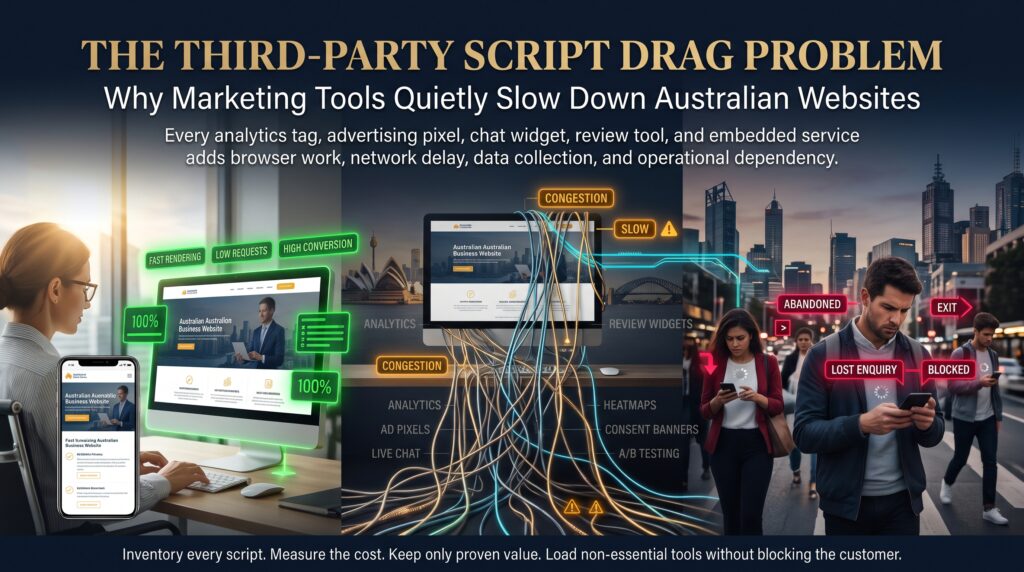
Third-party script drag is the slow, cumulative slowdown that appears when a website carries more code from outside vendors than its visitors’ devices can comfortably handle. Every analytics tag, advertising pixel, live chat widget and heatmap tool looks harmless on its own. Added together, they turn a fast site into one that feels sticky, jumpy and slow, and nobody can point to the day it happened.
This is a common reason Australian websites that were fast at launch feel sluggish a year later. The design has not changed and the hosting has not changed. What changed is the pile of marketing tools quietly added over time. This guide explains what a third-party script is, how it slows a site, how it hurts Core Web Vitals, how to audit it and how to fix it, with practical points for businesses in Sydney, Melbourne, Brisbane, Perth, Adelaide and Canberra.
What Is Third-Party Script Drag?
A third-party script is a piece of code your website loads from another company’s servers rather than your own. Marketing and analytics tools depend on them. A tag manager, an advertising pixel, a chat widget, a session recording tool and an A/B testing platform each ask the visitor’s browser to download, parse and run extra code that you did not write and cannot directly control.
Third-party script drag is the combined cost of all that extra code. It is not one big failure. It is many small delays, such as extra network requests, extra processing and extra layout changes, that add up on every page view. Because each script has a business owner who values it, none of them feels like the problem, which is exactly why the drag persists.
Image alt text: Third-party script drag chart showing marketing tags, chat widgets and pixels loading after site files and keeping the main thread busy
Why Marketing Tools Slow Down a Website
Each type of delay has a different technical cause, but they all end with a visitor waiting. These are the main mechanisms.
- Extra network requests. Every vendor needs its own connection, which means extra lookups, handshakes and downloads before the script even runs.
- Main-thread work. Browsers run JavaScript on a single main thread. While a heavy third-party script is executing, the page cannot respond to taps, scrolls or clicks.
- Render blocking. A script placed in the wrong spot or loaded the wrong way can hold up the visible content from appearing.
- Script chains. One tag often loads another, which loads another, so a single line you added can trigger a cascade of requests.
- Layout shifts. Banners, chat bubbles, review badges and consent pop-ups that appear late push content around and make the page feel unstable.
- No control over updates. Vendors can change or enlarge their scripts without telling you, so a page that was fine last month can slow down overnight.
- Weaker devices and networks. A script that is fine on a developer’s laptop can be punishing on a mid-range phone using mobile data.
How a Third-Party Script Hurts Core Web Vitals
Google measures real-world page experience through Core Web Vitals, and web.dev’s guide to Web Vitals explains each metric in detail. Third-party code can damage all three.
Largest Contentful Paint (LCP)
LCP measures how quickly the main content appears. When a third-party script competes for bandwidth and processing early in the load, it can delay the hero image or headline. Google treats an LCP of about 2.5 seconds or less as good.
Interaction to Next Paint (INP)
INP measures how quickly a page responds after a tap or click. A busy main thread, often caused by a third-party script running long tasks, is a leading reason a button feels unresponsive. An INP of about 200 milliseconds or less is considered good.
Cumulative Layout Shift (CLS)
CLS measures visual stability. Late-loading widgets, cookie banners and embedded content that shift the layout push this score up. A CLS of about 0.1 or less is considered good.
Why Third-Party Script Drag Builds Up Quietly
Nobody sets out to slow their own website. The problem builds because of how marketing tools are added and, more importantly, how rarely they are removed.
- Tag managers make adding easy. A tag manager lets a marketer publish a new tag in minutes, often without a developer reviewing its impact.
- Nobody owns the full list. Marketing, sales, support and agencies each add tools, and no single person sees everything running on the site.
- Campaigns end, tags stay. A pixel for a finished campaign keeps loading for years because nobody remembers to switch it off.
- Duplicates pile up. Two analytics tags, two chat tools or repeated pixels appear after migrations and agency handovers.
- Testing happens on fast devices. The slowdown is invisible on a powerful laptop and an office connection.
- “One more pixel” feels free. Because every tool arrives with a clear benefit, the cost to speed is overlooked.
What Third-Party Script Drag Costs Australian Businesses
A slow site costs money in several places at once, and the cost of third-party script drag is easy to miss because it is spread out.
- Lost enquiries and sales. Visitors who wait or struggle to tap a button often leave, and mobile visitors are the least patient.
- Wasted advertising spend. Paid traffic lands on a page that loads slowly, so part of every click’s value is lost before the visitor sees an offer.
- Weaker search performance. Page experience is one of many signals Google considers, and poor Core Web Vitals can hold back a site that is otherwise strong.
- Frustrated customers. Janky pages and unresponsive menus hurt trust, particularly in online stores and quote forms.
- Higher maintenance effort. The more tools a site carries, the more can break during updates, as we discuss in ecommerce maintenance.
The irony is sharp. Most marketing tools are added to improve results, yet an unmanaged pile of them can reduce the very conversions they were meant to measure.
Signs of Third-Party Script Drag on Your Website
You can often spot the problem without any special tools.
- The site feels fast on the office network but slow on a phone using mobile data.
- Menus, filters or the add-to-cart button respond late after the page appears to have loaded.
- Content jumps around as banners and chat bubbles appear.
- Speed test reports repeatedly flag “reduce the impact of third-party code”.
- Nobody can list every tag, pixel and widget the site loads.
- Speed got worse after a marketing agency, a new tool or a campaign launch.
- Core Web Vitals in Google Search Console show URLs needing improvement.
How to Audit a Third-Party Script Problem
An audit turns a vague feeling of slowness into a ranked list of scripts to keep, change or remove. You can complete a basic version in a day.
- List every script. Check your tag manager, your theme or template files and your plugins. Include anything added by agencies or former staff.
- Run a speed test. Use PageSpeed Insights on your key pages, on mobile first, and note the third-party items it reports.
- Inspect the network. In the browser’s developer tools, open the Network panel and sort by domain to see which outside vendors load and how much they transfer.
- Find the main-thread cost. Use the Performance panel to see which scripts run long tasks that block the page.
- Test by blocking. Block a vendor’s requests in the developer tools and compare how the page behaves, which shows what that tool really costs.
- Assign an owner and a purpose. For each script, name the person who needs it and the decision it supports. If nobody can, it is a removal candidate.
- Check field data. Review the Core Web Vitals report in Search Console to see how real visitors experience the site.
How to Fix Third-Party Script Drag
Fixing third-party script drag is a mix of removing, delaying and governing. The aim is to keep the tools that earn their place and stop the rest from taxing every visitor.
- Remove what is unused. Delete tags for old campaigns, duplicate tools and vendors nobody uses.
- Load scripts the right way. Use asynchronous or deferred loading so scripts do not block the page from appearing.
- Delay non-essential tools. Load chat widgets, heatmaps and recording tools after the page is interactive or when a visitor engages.
- Use click-to-load for heavy embeds. Show a lightweight placeholder for videos and maps and load the real thing only when someone clicks.
- Limit tags to the pages that need them. Trigger conversion pixels only on the pages where they matter, not site-wide.
- Consider server-side tagging. Moving some tag processing from the visitor’s browser to a server can reduce the work done on the device, as explained in Google Tag Manager’s documentation.
- Load tools after consent. Tie advertising and tracking scripts to the visitor’s consent choice so they only run when permitted.
- Reserve space for late content. Set fixed dimensions for banners and widgets so they do not shift the layout.
- Set a script budget. Agree how many third-party scripts and how much load time the site can afford, and require a trade-off for every new addition.
- Re-test regularly. Run a speed check monthly and after every new tool, so drift is caught early.
Good fixes need developers and marketers working together. Marketers know what each tool is for, and developers know what it costs the page. Our web design and development team often runs this kind of joint review, and our article on top web development trends for 2026 explains why performance now sits at the centre of modern site builds.
A Practical Guide to Loading Common Marketing Scripts
Different tools suit different loading strategies. The table below is a general starting point, and your own testing should decide the final approach.

| Script type | Typical purpose | Smarter loading approach |
| Analytics | Measure visits and behaviour | Keep one instance, load asynchronously, avoid duplicates |
| Advertising and social pixels | Remarketing and conversion tracking | Load after consent and only on relevant pages |
| Live chat widgets | Customer support and leads | Delay until interaction or after the page is ready |
| Heatmaps and session recording | User behaviour research | Run on selected pages or for limited test periods |
| A/B testing tools | Experiments on layouts and offers | Keep lean, avoid flicker, remove when tests finish |
| Embedded video and maps | Content and directions | Use a click-to-load placeholder |
| Reviews and social widgets | Social proof | Lazy-load below the fold |
Third-Party Script Drag Across Australian Cities
Visitors, devices and networks vary across the country, and so do the pressures on local businesses. You can explore our locations for the full list.
Sydney
Competitive retail, finance and professional services sites in Sydney run heavy marketing stacks, so unmanaged tags quickly add up. Talk to our web development team in Sydney.
Melbourne
Melbourne’s busy online retail and service businesses often depend on mobile traffic, where script weight is felt most. See our web development services in Melbourne.
Brisbane
Tourism, construction and trades businesses in Queensland rely on fast enquiry forms and phone-friendly pages. Browse our web development services in Brisbane.
Perth
Mining services and regional businesses in Western Australia often reach customers on variable connections, where lean pages matter. Check out our web development services in Perth.
Adelaide
Manufacturing, health and local service businesses in South Australia benefit from simple, fast sites that convert. Learn more about our web development services in Adelaide.
Canberra
Government suppliers and professional services in Canberra often need clean, accessible and well-governed websites. View our web development services in Canberra.
Web Development Services That Fix Third-Party Script Drag
A speed problem caused by outside scripts often sits on top of a platform that needs attention. Our web development services in Australia cover the main platforms and the work around them.
- WordPress Development: fast, easy-to-edit sites built for performance and search.
- WooCommerce Development: online stores built to reduce friction and load quickly.
- Shopify Development Services: theme and app work focused on conversion and speed.
- Webflow Development and Magento Development: specialist builds for larger or design-led projects.
- Ecommerce Redesign and Ecommerce Migration: clean-ups that remove years of accumulated tags.
- Ecommerce SEO and Ecommerce Maintenance: ongoing technical care so speed does not slip back.
- Small Business Website Development and B2B Ecommerce Development: right-sized builds for different business models.
Not sure where to start? Our FAQ page answers common questions, and the blog has more guides, including why every business needs a professional website and what ecommerce web design is and why it matters. If you are comparing platforms, read Shopify vs WooCommerce for Australian businesses.
Frequently Asked Questions About Third-Party Script Drag
What is a third-party script?
It is code your website loads from another company’s servers, such as analytics, advertising pixels, chat widgets, heatmaps and testing tools.
Do marketing tags really slow down a website?
Yes, they can. Each tag adds network requests and processing work, and a large collection of tags can noticeably slow loading and make a page feel unresponsive, especially on mobile.
Is Google Tag Manager slow?
The tag manager itself is small. The slowdown comes from what you publish through it. A tidy container with a few well-managed tags is very different from one holding dozens of old pixels.
How many third-party scripts is too many?
There is no universal number. A better test is whether each script earns its cost. If a tool has no owner, no clear purpose or no recent use, remove it.
Can you fix third-party script drag without losing tracking?
Usually, yes. Removing duplicates, loading tools later, limiting tags to relevant pages and using server-side tagging often keep the data you need while reducing the load on visitors.
Final Thoughts: Make Every Script Earn Its Place
Third-party script drag is a governance problem as much as a technical one. The fix is to list every script, give each one an owner and a reason, remove what nobody needs and load the rest in a way that respects your visitors’ time. Do that regularly, and your marketing tools can keep measuring results without quietly working against them.
Want to know what your site is carrying? Visit Web Development Company Australia, request a free audit or quote, or call 1300 649 299 to speak with our team.