



A redirect chain is what you get when one old URL sends visitors through two, three or even five other addresses before they reach the page they wanted. It is one of the most common and most overlooked side effects of a website migration. Nothing looks broken, pages still load and the launch party goes ahead. But weeks later organic traffic is down, pages feel slower and sales are softer. If that sounds familiar, a redirect chain problem is a likely suspect.
This guide explains how redirect chains form, why they hurt both SEO and conversions, how to find them and how to fix them. It is written for business owners, marketers and developers across Australia, from Sydney and Melbourne to Brisbane, Perth, Adelaide and Canberra.
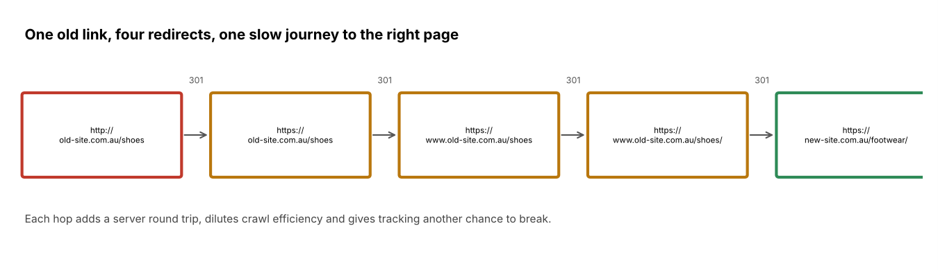
What Is a Redirect Chain?
A redirect tells browsers and search engines that a page has moved. You can read the general idea in this overview of URL redirection. A single permanent redirect (a 301) from the old address to the new one is healthy and expected after a migration.
It happens when that journey has more than one hop. Address A redirects to B, B redirects to C and C finally lands on D. Each step might be a sensible rule on its own. Together they create a slow and fragile path. A related issue is a redirect loop, where the path goes in circles and the page never loads. You can see how each response works in this list of HTTP status codes.
How Redirect Chains Form During a Website Migration
Redirect chains rarely come from one mistake. They pile up in layers, usually because several people or tools each add their own rules:
- Old redirects are never cleaned up. The site was already redirected once in 2019. The new migration adds a second layer on top.
- Protocol and domain rules stack. http goes to https, then non-www goes to www, then a trailing slash is added. That is three hops before the page even starts to redirect to its new address.
- URL structures change more than once. A staging plan changes the folder names after the redirect map has been written, so the map points to URLs that no longer exist.
- Plugins and server rules overlap. A WordPress redirect plugin, a CDN rule and an .htaccess file may all handle the same URL.
- Platform switches add their own rules. Moving to Shopify, WooCommerce or another platform often creates automatic redirects, such as collection or product handle changes.
- Internal links still point to old URLs. Menus, blog posts and buttons keep linking to old addresses, so every click triggers a redirect.
- Mixed redirect types. 301, 302, 307 and even JavaScript or meta refresh redirects are mixed together, which confuses search engines.
The result is a quiet mess that no one notices on launch day because the final page still appears.
Why a Redirect Chain Damages SEO
Google generally follows redirects and passes signals through permanent ones, as explained in Google Search Central’s redirect guidance. But long chains of hops make that harder, slower and riskier:
- Wasted crawl budget. Search engine bots spend requests following hops instead of discovering and refreshing your real content. On larger sites this slows indexing.
- Weaker ranking signals. Every extra hop is another chance for something to go wrong, such as a rule being removed or a redirect type being changed to temporary.
- Slower indexing of new URLs. After a migration you want new pages indexed quickly. Extra hops delay that.
- Mixed signals. Canonical tags, sitemaps and internal links that point to redirected URLs tell Google two different stories about which page is the real one.
- Risk of dropped hops. Search engines only follow a limited number of redirects in a row. Long chains, especially with loops, can end in a page that is never reached.
Why a Redirect Chain Hurts Conversions Too
Many people treat redirects as a pure SEO topic. They are also a speed and tracking topic, which means they hit revenue directly.
- Slower pages. Every hop adds a network round trip before the browser can even start loading the page. On mobile connections this is noticeable, and speed work covered on dev shows how small delays affect experience.
- Higher bounce rates. Visitors who click a search result or an ad and wait on a blank screen often leave.
- Lost campaign data. Some redirects drop query strings. UTM tags and click IDs vanish, so paid traffic looks like direct traffic and reports are wrong.
- Broken checkout paths. Redirects around cart, login and payment pages can cause errors, lost sessions or cookie problems.
- Lost trust. Warnings, flickering pages or the wrong landing page make a business look careless.
Example: A Redirect Chain After a Platform Migration
Picture a footwear retailer in Melbourne that moves from an older custom platform to Shopify. The team builds a careful redirect map from old product URLs to new ones. But the old site was already redirecting http to https, non-www to www and adding a trailing slash.
So an old backlink to /shoes/boots now passes through four redirects before landing on the new collection page. Google Search Console shows slow recrawling, and the retailer’s paid ads that point at old URLs lose their tracking parameters. Organic traffic dips 18% in six weeks and the team blames the new design. The real cause was a hidden chain of hops that nobody tested end to end. (This is an illustrative scenario, not a specific client.)
How to Find a Redirect Chain on Your Website
You do not need to guess. A few tools will show you the problem quickly:
- Crawl your site. Tools such as Screaming Frog SEO Spider have a dedicated report that lists every URL with more than one hop.
- Check Google Search Console. Look at the page indexing report for “Page with redirect” and sudden changes in crawl stats after launch.
- Test your old URLs. Take your top landing pages, top backlinked URLs and paid ad URLs from before the migration and test each one in a header checker.
- Review server logs. Look for repeated 301 responses to the same bots and users.
- Inspect your analytics. Look for a drop in organic landing pages, a rise in direct traffic and missing UTM parameters.
How to Fix a Redirect Chain: 7 Steps
1. Collapse every chain into one hop
Every old URL should point straight to its final destination with a single 301. If A goes to B and B goes to C, change A to point to C.
2. Build the redirect map from real data
Use a full crawl of the old site, Search Console data, analytics and backlink reports to decide which URLs need a redirect. Do not rely on a guess or a one-page spreadsheet.
3. Combine protocol, domain and trailing-slash rules
Handle http to https, non-www to www and slash rules in one server-level rule, so a visitor never goes through them one at a time.
4. Update internal links, canonicals and sitemaps
Your own site should never link to a redirected URL. Update menus, body links, canonical tags and XML sitemaps so they point to the final address.
5. Use the right redirect type
Use 301 (or 308) for permanent moves. Avoid temporary redirects for pages that have moved for good, and avoid JavaScript or meta refresh redirects for SEO-critical pages.
6. Preserve parameters and test paid and email links
Check that UTM tags and click IDs survive the redirect. Update ad destination URLs so that paid traffic lands directly on the new page.
7. Monitor after launch and keep redirects live
Re-crawl weekly for the first month, then monthly. Google suggests keeping redirects in place for at least a year, so plan to keep them for longer if the old URLs still have backlinks.
Common Redirect Problems and What to Do About Them
| Problem | Typical cause | Fix |
| Multi-hop chain | Old redirects plus new migration rules | Point the original URL straight to the final URL |
| Redirect loop | Conflicting rules in plugin, CDN and server | Remove duplicate rules and retest |
| Temporary (302) used for permanent move | Default platform setting | Switch to a 301 or 308 |
| Internal links to redirected URLs | Menus and posts never updated | Update links to final addresses |
| Redirected URLs in sitemap | Sitemap generated before migration | Regenerate sitemap with final URLs only |
| Lost tracking parameters | Redirect rule drops query strings | Pass query strings through and retest |
Website Migration Checklist to Prevent a Redirect Chain
- Crawl the old site and export every indexable URL, plus top backlinked pages and top landing pages.
- Create a one-to-one redirect map to the final new URLs.
- Test the map on a staging site before launch, including http, www and slash variations.
- Update internal links, canonical tags and sitemaps before go-live.
- After launch, crawl the live site and confirm no URL has more than one redirect.
- Check paid, email and social links for tracking and landing page accuracy.
- Watch Search Console and analytics daily for two weeks, then weekly for three months.
Get Expert Help With Migrations and Redirects in Australia
A clean migration protects the rankings and sales you have already earned. Our team plans redirects, tests them and monitors results so your new site starts strong. Explore our website migration services, ecommerce SEO and ecommerce website redesign work, or see our wider web design and development services.
We build on the platforms Australian businesses use most, including Shopify, WooCommerce and WordPress. We work with clients in:
- Web development in Sydney
- Web development in Melbourne
- Web development in Brisbane
- Web development in Perth
- Web development in Adelaide
- Web development in Canberra
Have questions first? Read our FAQs, see all locations, learn about us or contact us on 1300 649 299 for a free website audit.
Redirect Chain FAQs
What is a redirect chain?
It is a series of two or more redirects between the first URL requested and the final page. It slows loading and makes it harder for search engines to process your site.
Does a redirect chain hurt SEO?
It can. Long chains waste crawl budget, delays indexing and adds risk that signals are lost along the way. A single 301 redirect is fine, but long chains should be fixed.
How many redirects are too many?
Aim for one. Search engines can follow several hops, but every extra step adds delay and a chance of failure, so best practice is a single redirect from the old URL to the final URL.
How do I fix redirect chains after a migration?
Crawl the site, list every URL with more than one hop and update each rule to point straight to the final page. Then fix internal links, canonicals and sitemaps, and re-crawl to confirm.
Do redirects affect conversion rates?
Yes. Redirects add load time, can drop tracking parameters and may break checkout or login flows, all of which lower conversion rates and distort reporting.
Final Thoughts on the Redirect Chain Problem
This is a quiet problem with loud consequences. It slows pages, wastes crawl budget, breaks tracking and undermines the SEO value you worked years to build. The fix is straightforward: map redirects from real data, send every old URL to its final destination in one hop, update your internal links and test thoroughly after launch. Do that and your next migration will protect your traffic instead of draining it.
Planning a migration? Talk to our team about website migration services or request a free audit today. For more practical advice, visit the Web Development Company blog.