
The website dependency trap is what happens when a business owns a website it is afraid to touch. The site is live and it is supposed to be bringing in enquiries, yet every small change, from a new phone number to a price update, turns into an email chain, a quote and a week of waiting. If that sounds familiar, you are far from alone.
Across Sydney, Melbourne, Brisbane, Perth, Adelaide and Canberra, we see the same story again and again. A website gets built by a freelancer, an agency or a helpful cousin. It works well for a while. Then the builder moves on, the plugins age, the logins get lost, and the business is left with a site nobody on the team can safely update. This guide explains how the website dependency trap forms, what it really costs, and how to get out of it without rebuilding everything from scratch.
| Quick answer: Yes, most businesses can edit text and swap images on their own site. But changing plugins, themes, code, hosting, DNS or tracking without backups, a staging site and someone who understands the setup is how Australian businesses lose rankings, leads and sometimes the whole website overnight. |
What Is the Website Dependency Trap?
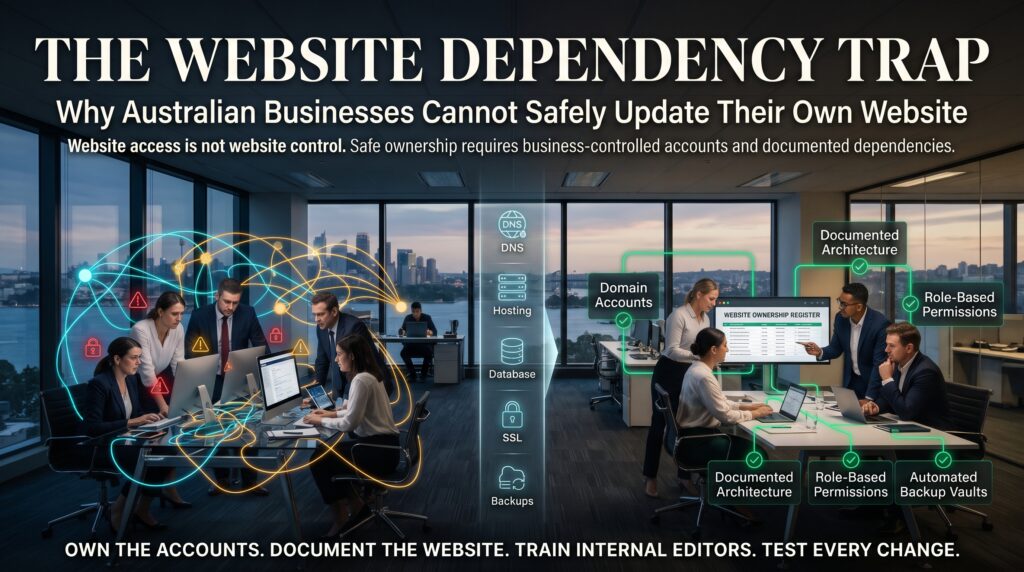
Think of it as three dependencies stacked on top of each other. The first is technical dependency: the site is built in a way only the original developer understands. The second is knowledge dependency: nobody in the business knows how the site is set up, which plugins it relies on or where the backups live. The third is access dependency: someone else holds the keys, whether that is the domain, the hosting account, the WordPress admin login or the Google Search Console property.
The website dependency trap is self-reinforcing, because each layer makes the next one worse. Fear of breaking things means updates get delayed. Delayed updates mean outdated software. Outdated software means more risk, which makes the business even more nervous about touching anything. Round and round it goes, until something breaks and the only option is an expensive emergency fix.
This is not only a WordPress problem. The website dependency trap also appears on Shopify, WooCommerce, Wix, Squarespace and custom builds.
How Australian Businesses End Up in the Website Dependency Trap
Nobody sets out to get stuck. It usually happens through a handful of very ordinary decisions made years ago.
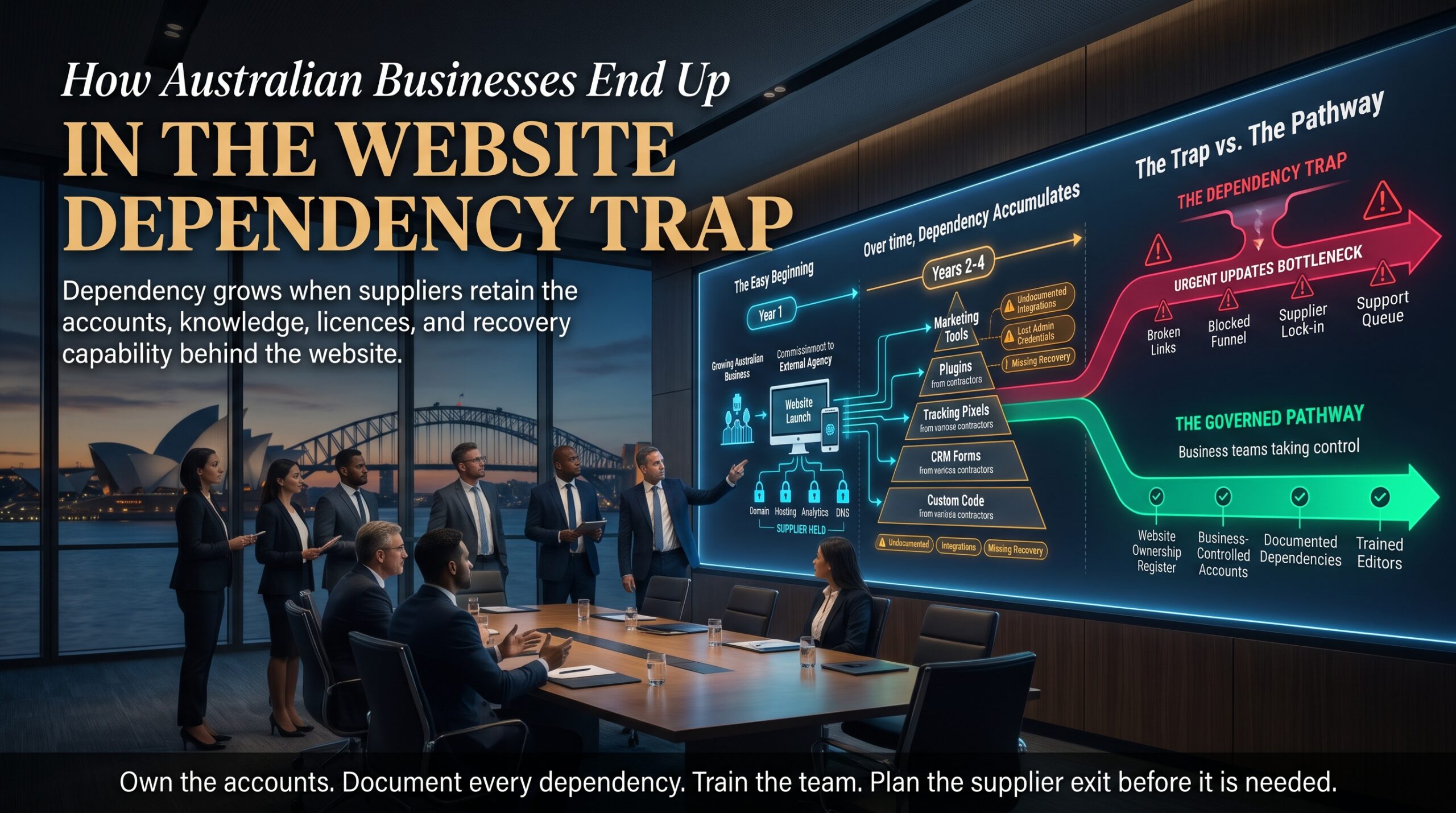
1. The original developer holds the keys
The site was built quickly, the developer was great, and nobody thought to ask for full admin access. Years later that developer has changed careers, moved overseas or simply stopped replying. The business can see its website but cannot change any of it.
2. The site runs on a heavy plugin and page builder stack
Tools like Elementor, WooCommerce and dozens of add-on plugins make building fast, but every extra layer is another thing that needs updating and another thing that can conflict. Around 40 per cent of the web runs on WordPress, which is why it is also the most targeted platform for automated attacks. A site with 30 plugins and no maintenance plan is a fragile system.
3. Domain, hosting and DNS sit in someone else’s account
We regularly meet business owners who discover their .com.au domain was registered under a former employee’s personal email, or that hosting is billed to a web designer who closed their business. Domain names in Australia are governed by auDA rules, and the registrant details matter. If renewal reminders go to a dead inbox, the website can disappear.
4. Nothing was ever documented
There is no list of logins, no record of which plugins are essential, no note explaining why a certain redirect exists. Every change becomes a guessing game, and guessing is how websites break.
5. The person who knew has left
In smaller teams, one person often becomes the unofficial website owner. When they leave, the knowledge goes with them.
Why You Cannot Safely Update Your Own Website, Even With a Login
Having a username and password is not the same as being able to make changes safely. Here is where well-meaning DIY updates tend to go wrong.
Plugin and theme conflicts
Clicking “Update all” feels harmless. But when one plugin updates and another does not, forms can stop sending, checkouts can freeze and layouts can collapse. Without a staging copy to test on, you are experimenting on the live site your customers are using.
Security patches you cannot afford to skip
Skipping updates is just as risky as rushing them. The Australian Cyber Security Centre lists timely patching as a core part of its Essential Eight cyber security strategies, and small businesses are not exempt. A website with known vulnerabilities is an open invitation for malware, spam injections and defacement.
Hidden SEO damage
Changing a page URL without a redirect, deleting an old service page, or switching on the wrong setting can quietly wipe out years of rankings. Google Search Central is clear that URLs, titles, internal links and crawlability all affect how your pages are understood. One accidental “noindex” tag can remove a page from Google entirely, and you might not notice until enquiries dry up.
Broken tracking and wasted ad spend
Google Analytics 4, Google Tag Manager and Google Ads conversion tags are usually installed once and forgotten. A theme change or plugin update can remove them silently. You keep paying for clicks while your reports show zero conversions, and you lose the data you need to make good decisions.
Slower pages and weaker Core Web Vitals
Uploading oversized images, adding another tracking script or installing a “quick” slider plugin can push your Core Web Vitals into the red. Slow sites frustrate visitors and give competitors an advantage, especially on mobile.
Privacy and compliance risks
If your contact forms, checkout or booking system collect personal information, the Privacy Act 1988 as explained by the OAIC may apply to how that data is handled. A form that stops working, or a plugin that stores data insecurely, can turn a small website issue into a compliance headache. Outdated pricing claims can also raise Australian Consumer Law issues.
What Can You Safely Edit and What Needs a Developer?
The good news is that you do not need to hand over every change. A sensible split keeps your team in control of content while protecting the technical foundations.
| Task | Risk Level | Who Should Do It |
| Fix typos and update blog or page text | Low | Your team, using preview before publishing |
| Swap or add images | Low to medium | Your team, with compressed images and alt text |
| Update phone, address and opening hours | Low | Your team, then match your Google Business Profile |
| Edit page titles and meta descriptions | Medium | Your team with SEO guidance |
| Change a page URL or delete a page | High | Developer, because redirects are required |
| Update plugins, theme or PHP version | High | Developer, after a backup and staging test |
| Edit tracking codes, pixels or tags | High | Developer or analytics specialist |
| Change forms, checkout or booking flows | High | Developer, with full testing |
| Move hosting or change DNS | Very high | Developer, with a planned cutover |
7 Warning Signs You Are Already in the Website Dependency Trap
- You do not know who controls your domain name or hosting account.
- Nobody can say when WordPress, your theme or your plugins were last updated.
- Every small change needs a quote and a waiting period.
- Your developer is slow to respond, or has disappeared altogether.
- Your team is scared to click the update button.
- You have never seen a backup restored successfully.
- Leads, speed or rankings have dropped and nobody can explain why.
If you ticked even two of these, you are in the website dependency trap. The good news is that it is fixable, and usually much faster than people expect.
Real-Life Website Dependency Trap Scenarios Across Australia
These composite scenarios show the website dependency trap in action. They are based on common patterns, not individual client case studies.
Sydney: A hospitality group runs its online booking through a plugin. A routine update on a Friday afternoon breaks the booking form, and nobody notices until Monday. A weekend of bookings is lost. Our Sydney web development team sees this pattern often.
Melbourne: An accounting firm edits a service page and changes its URL to tidy things up. With no redirect in place, the page falls out of Google, and enquiries drop for months. Businesses in Melbourne with competitive service keywords are especially exposed.
Brisbane: A trades supplier finds out its domain was registered by a former employee. The renewal notice goes to an inbox nobody checks, and the website goes offline. Recovering it takes days. Support for Brisbane businesses often starts with a simple ownership audit.
Perth: A mining services company has a custom-coded site written by a freelancer who has since moved on. No documentation exists and nobody can read the code. For a growing Perth business, that creates a real barrier to change.
Adelaide: A health clinic changes its email provider, and the website contact form quietly stops delivering enquiries. Nobody tests it for weeks. Adelaide clinics and other service businesses rely on forms working every single day.
Canberra: A consultancy supplying government clients finds its outdated site fails a procurement security check. In Canberra, buyers often expect up-to-date, well-maintained digital properties.
How to Escape the Website Dependency Trap in 7 Steps
- Audit ownership. List who controls the domain, hosting, CMS admin, DNS, business email, Google Analytics, Google Search Console, Google Tag Manager, Google Ads and Google Business Profile.
- Move everything into your business name. Use a company email address, keep at least two administrators on every account, and store credentials in a proper password manager.
- Take a full backup and test the restore. A backup you have never restored is only a hope. Confirm it works before you change anything.
- Set up a staging site. This is a private copy where updates and design changes can be tested without risk to your live pages.
- Document the setup. Create a short owner’s manual covering the platform, theme, key plugins, integrations, hosting details and how to publish content.
- Create an update schedule. Weekly checks for security patches and monthly reviews of plugins, speed and broken links keep small problems small.
- Choose your operating model. Train your team to handle content, and give the technical work to a maintenance partner with a clear response time.
What a Good Website Maintenance Partner Actually Does
Ongoing website maintenance is not about charging you to change a comma. It is about keeping your website secure, fast and ready to convert. A reliable partner helps you escape the website dependency trap and should cover:
- Automated daily backups with tested restores
- Plugin, theme and core updates on a staging site first
- Security monitoring, malware scanning and uptime alerts
- Core Web Vitals and page speed monitoring
- Technical SEO hygiene, including redirects, indexing and broken links
- Small content and design changes within an agreed turnaround time
- Clear monthly reporting and a named point of contact
If you want a team that works this way, explore our web design and development services or browse the full list of website services. Online stores have extra moving parts such as payments, stock and checkout flows, which is why our ecommerce agency services include structured maintenance for WooCommerce and Shopify stores.
When it is time to rebuild instead
Sometimes the most honest advice is that the site is beyond saving. If your theme has been abandoned, your server runs an unsupported PHP version, or the builder is a decade old, patching it further is throwing good money after bad. Our guides on why every business needs a professional website and top web development trends for 2026 explain what a modern, maintainable build looks like.
The Real Cost of Staying in the Website Dependency Trap
The invoice for a maintenance plan is easy to see. The cost of doing nothing is harder to spot, which is exactly why it gets ignored. Staying in the website dependency trap usually means paying for emergency repairs at premium rates, losing leads while forms or checkouts are broken, wasting ad budget on pages that do not convert, and carrying reputation risk if your site is hacked or shows warnings.
Website Support for Businesses in Every Major Australian City
Whether you run a single-location shop or a national service business, we help teams escape the website dependency trap across Australia. You can find local information for Sydney, Melbourne, Brisbane, Perth, Adelaide and Canberra, or visit our locations hub to see how we support clients nationwide.
Frequently Asked Questions About the Website Dependency Trap
What is the website dependency trap?
It is when a business cannot safely change its own site because the technical knowledge, the access or the process sits with someone else.
Can I update my own website safely?
Yes, for content such as text, images and blog posts, provided you use a preview and keep backups. Technical changes like plugin updates, URL changes, tracking edits and hosting moves should be done by someone who can test them first.
Who owns my website if my developer built it?
It depends on your agreement. Ownership of the domain, hosting account and content should sit with your business. If you are unsure, check who is listed as the registrant and account holder, and request written confirmation of access and intellectual property.
What should I do if my web developer has disappeared?
Start by confirming domain and hosting ownership through your registrar and host. Then arrange a full backup, regain admin access and have the setup reviewed. It is usually possible to recover control without rebuilding the site.
How often should a website be updated and maintained?
Review security and software updates weekly, run a fuller health check monthly, and refresh content whenever services, pricing or contact details change.
How much does website maintenance cost in Australia?
Pricing varies with the platform, the number of plugins, whether you run an online store and how much support you need. Instead of chasing the lowest price, compare what is included: backups, security, updates, response times and reporting. A free website health check is a good starting point for an accurate quote.
Final Thoughts: Own Your Website Instead of Fearing It
The website dependency trap is common, but it is not permanent. Once you know who controls what, have tested backups, a staging site and a simple update routine, your website becomes an asset you can rely on rather than a risk you avoid. If you are stuck in the website dependency trap, our team can review your ownership, security and update setup and give you a practical plan.
Ready to take control? Contact our team for a free website health check, or learn more about our web design and development services.